
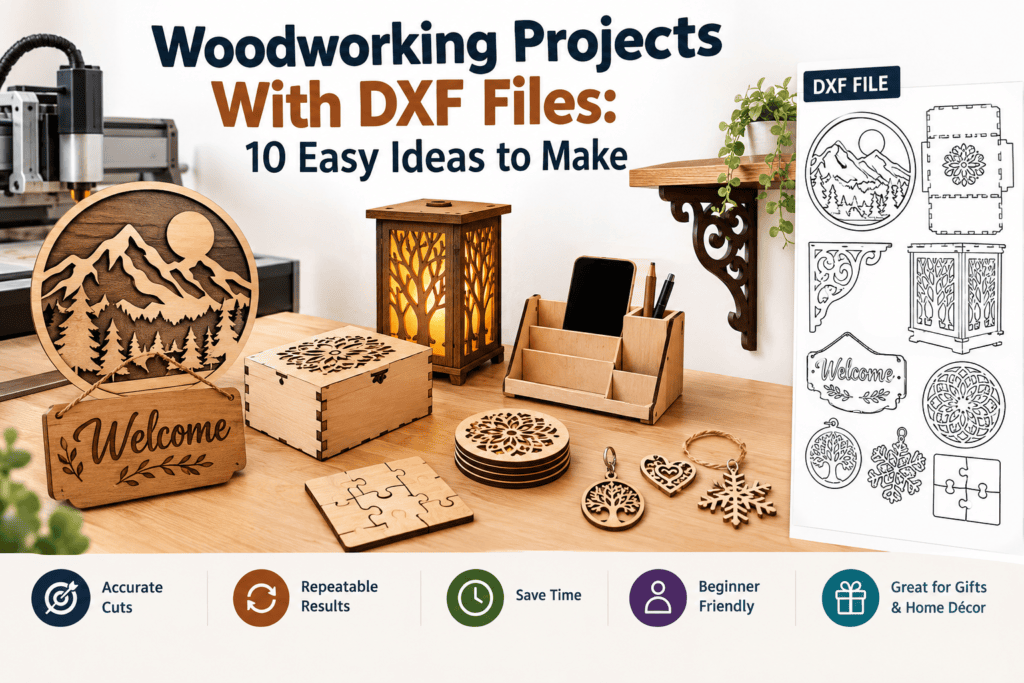
Looking for woodworking projects with DXF files that you can finish in a weekend? A DXF file gives your CNC router or laser cutter an exact cutting path, so you can turn a sheet of plywood into wall art, boxes, signs and gifts without drawing a single line yourself.
This guide shares 10 easy woodworking projects with DXF files, plus tips for choosing the right design and material. If you’re new to the format, start with our guide on what DXF files are.
Why Choose Woodworking Projects With DXF Files?
- Accurate cuts: the machine follows the exact lines in the file.
- Repeatable results: you can make the same design again and again.
- Faster projects: no need to draw or trace patterns by hand.
- Good for beginners: ready-made files let you start without CAD skills.
- Easy to sell or gift: many woodworking projects with DXF files make popular handmade products.
10 Easy Woodworking Projects With DXF Files
1. Wall Art and Wall Décor
Layered wall art, geometric panels and mandalas are some of the most popular woodworking projects with DXF files. They look impressive but need only flat cuts, and you can stack thin layers for a 3D effect.
Best material: 3 mm to 6 mm plywood.
2. Coasters
Coasters are a perfect first project. They are small, use little material and are quick to cut. Choose a simple round or square design with a decorative pattern.
Best material: 3 mm plywood or MDF. Seal them if they will touch drinks.
3. Personalised Signs
Name signs, house number plaques and welcome signs are always in demand. Pick a design with clear lettering and a hanging hole.
Best material: 6 mm plywood or solid wood.
4. Keychains and Ornaments
Small cuts like keychains, tags and holiday ornaments use scraps of leftover wood. They also make great gifts and market stall items.
Best material: thin plywood or leftover offcuts.
5. Storage Boxes
Finger-joint boxes cut from a DXF file fit together without glue or with only a little. They are useful for jewellery, desk items and gifts.
Best material: 3 mm to 6 mm plywood. Test the joint fit on scrap first.
6. Shelves and Wall Brackets
Decorative shelf brackets and floating shelf supports are practical projects. Check the weight limit and use strong material, since shelves carry load.
Best material: thicker plywood or hardwood, and always use proper fixings.
7. Puzzles and Games
Jigsaw puzzles, tic-tac-toe boards and wooden brain teasers are fun to make and great for children’s gifts. Sand all edges smooth and use non-toxic finishes for anything children will handle.
Best material: 3 mm plywood.
8. Lamps and Lanterns
Cut-out patterns let light shine through, so woodworking projects with DXF files can include night lights and lanterns. Always use LED lights, not open flames or hot bulbs, near wood.
Best material: thin plywood.
9. Furniture Parts and Organisers
Desk organisers, phone stands and small tables use flat-pack parts cut from DXF files. Larger pieces need a bigger machine and careful measuring.
Best material: 6 mm to 18 mm plywood, depending on the piece.
10. Seasonal Decorations
Snowflakes, pumpkins, wreaths and table centrepieces are easy to cut and sell well at certain times of year.
Best material: thin plywood, often painted.
How to Choose the Right Design
Pick woodworking projects with DXF files that match your machine and skill level:
- Check the size. The design must fit your machine bed. Adjust the scale if needed.
- Match the thickness. Boxes and joints must suit your actual material thickness.
- Look for clean lines. Closed paths and no duplicates make for clean cuts.
- Check the layers. Cut, engrave and guide lines should be separate. See our guide to DXF layers for laser cutting.
For more help, read how to choose the best DXF files.
Best Wood Materials for Woodworking Projects With DXF Files
| Material | Good For | Notes |
|---|---|---|
| Plywood | Most projects | Strong and popular with beginners |
| MDF | Painted pieces, boxes | Smooth, but makes more dust and smoke |
| Solid wood | Signs, shelves | Cuts differently depending on grain |
| Bamboo plywood | Coasters, gifts | Attractive finish |
For a full comparison, see our list of the 7 best materials for CNC and laser cutting.
Steps to Start Your First Project
- Choose a simple design from the ideas above.
- Open the DXF file in your design software and check the size.
- Prepare the file for your machine and set up the layers.
- Run a test cut on scrap wood.
- Cut your project, then sand, stain or paint it.
If you use a laser, read our guide to laser cutting for beginners for safety tips. If something looks wrong in your file, see 7 common DXF file problems and how to fix them.
Safety Tips
- Wear a dust mask when sanding or working with MDF.
- Ventilate well when laser cutting wood, as it produces smoke.
- Never leave a laser cutter running unattended.
- Check that finishes and glues are safe for the final use, especially for children’s items and kitchen items.
Frequently Asked Questions
What are the easiest woodworking projects with DXF files for beginners?
Coasters, keychains and simple signs are the easiest. They are small, quick and use little material.
Can I sell items made from DXF files?
It depends on the licence that comes with the file. Always check the seller’s terms before selling products made from a design.
What machine do I need?
A CNC router or a laser cutter. Which one is best depends on the material thickness and the kind of cut you want.
Which wood is best for beginners?
Plywood is the most common choice because it is strong, affordable and easy to find.
Do I need to design my own files?
No. You can buy ready-made DXF files and adjust the size in free software. See our list of free CNC design software.
Conclusion
There are endless woodworking projects with DXF files, from quick coasters to wall art and furniture parts. Start with a simple design, test on scrap wood and build up to bigger projects as you gain confidence.
Ready to start making? Browse our collection of DXF and SVG designs for wall décor, signs and more at DXF Portal and download your next woodworking project today.